Excel 数据透视表存储结构浅析

Excel 数据透视表

  • 接上篇文章 说下 数据透视表的结构

XML存储结构

  • 先看四个图

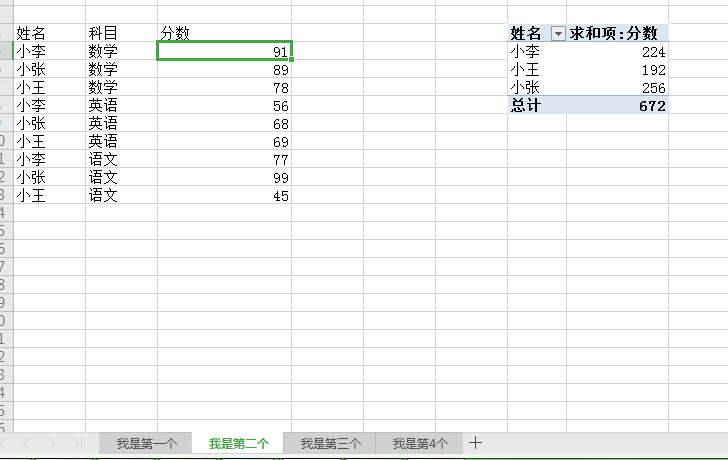
  • 图一 Excel 展示样式

upload successful

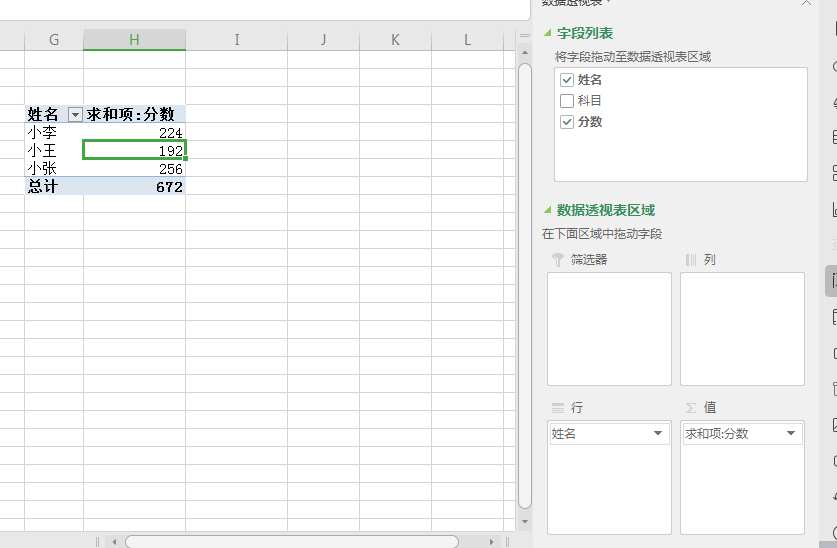
  • 图二 Excel 展示样式

upload successful

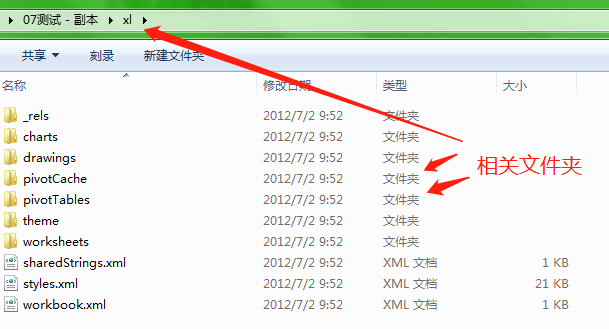
  • 图三 Excel解压后的结构

upload successful

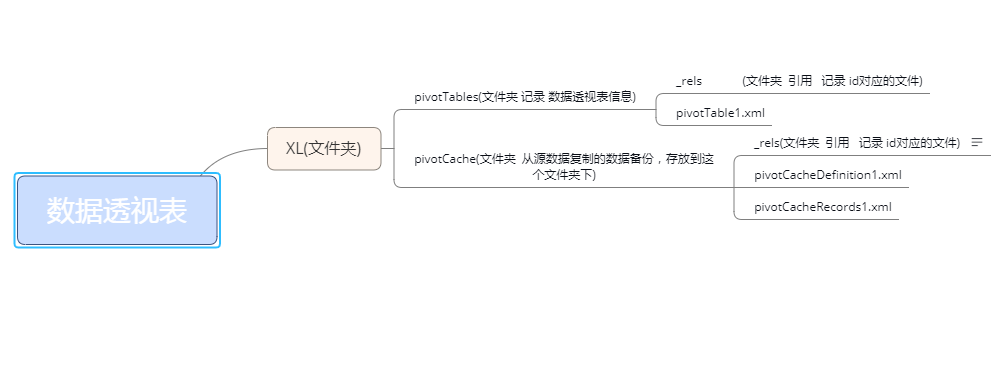
  • 图四 简要描述

upload successful

pivotCache

  • 数据透视表的数据源 可能多种多样,所以 Excel在存储上 对原始数据做了备份处理,这个pivotCache就是存储的备份数据,所以你改变了源数据值,数据透视表不会实时刷新,需要 手动刷新的原因
pivotCacheDefinition1.xml
1
2
3
4
5
6
7
8
9
10
11
12
13
14
15
16
17
18
19
20
21
22
23
24
25
26
27
28
29
30
31
32
33
34
35
36
37
38
39
40
41
<?xml version="1.0" encoding="UTF-8" standalone="yes"?>
<pivotCacheDefinition
xmlns="http://schemas.openxmlformats.org/spreadsheetml/2006/main"
xmlns:r="http://schemas.openxmlformats.org/officeDocument/2006/relationships" r:id="rId1" createdVersion="5" refreshedVersion="5" minRefreshableVersion="3" refreshedDate="43893.4935185185" refreshedBy="Administrator" recordCount="9">
//数据源 源数据 来自 我是第二个 的 A4:C13 区域
<cacheSource type="worksheet">
<worksheetSource ref="A4:C13" sheet="我是第二个"/>
</cacheSource>
// name 姓名 科目 分数 为源数据3列
<cacheFields count="3">
<cacheField name="姓名" numFmtId="0">
<sharedItems count="3">
//<s/> 代表是字符串
<s v="小李"/>
<s v="小张"/>
<s v="小王"/>
</sharedItems>
</cacheField>
<cacheField name="科目" numFmtId="0">
<sharedItems count="3">
<s v="数学"/>
<s v="英语"/>
<s v="语文"/>
</sharedItems>
</cacheField>
<cacheField name="分数" numFmtId="0">
<sharedItems containsSemiMixedTypes="0" containsString="0" containsNumber="1" containsInteger="1" minValue="45" maxValue="99" count="9">
//<n></n> 代表是数值
<n v="91"/>
<n v="89"/>
<n v="78"/>
<n v="56"/>
<n v="68"/>
<n v="69"/>
<n v="77"/>
<n v="99"/>
<n v="45"/>
</sharedItems>
</cacheField>
</cacheFields>
</pivotCacheDefinition>

pivotCacheDefinition1.xml 记录了原有的所有数据,但是还不够,因为 原先在Excel上 数据都是一行一列的,每个分数都可以找到对应的学生和科目,而pivotCacheDefinition1.xml 明显没有满足这个需求

pivotCacheRecords1.xml
1
2
3
4
5
6
7
8
9
10
11
12
13
14
15
16
17
18
19
20
21
22
23
24
25
26
27
28
29
30
31
32
33
34
35
36
37
38
39
40
41
42
43
44
45
46
47
48
49
50
51
<?xml version="1.0" encoding="UTF-8" standalone="yes"?>
<pivotCacheRecords
xmlns="http://schemas.openxmlformats.org/spreadsheetml/2006/main"
xmlns:r="http://schemas.openxmlformats.org/officeDocument/2006/relationships" count="9">
// <r/> 代表源数据的一行 <x/> 的下标对应 pivotCacheDefinition1.xml 中 <cacheField/> 在 // <cacheFields/>中的下标,属性元素 v对应的值 是 <sharedItems/> 中 元素的下标
<r>
<x v="0"/> //小李
<x v="0"/> //数学
<x v="0"/> //91
</r>
<r>
<x v="1"/>//小张
<x v="0"/>//数学
<x v="1"/>//89
</r>
<r>
<x v="2"/>
<x v="0"/>
<x v="2"/>
</r>
<r>
<x v="0"/>
<x v="1"/>
<x v="3"/>
</r>
<r>
<x v="1"/>
<x v="1"/>
<x v="4"/>
</r>
<r>
<x v="2"/>
<x v="1"/>
<x v="5"/>
</r>
<r>
<x v="0"/>
<x v="2"/>
<x v="6"/>
</r>
<r>
<x v="1"/>
<x v="2"/>
<x v="7"/>
</r>
<r>
<x v="2"/>
<x v="2"/>
<x v="8"/>
</r>
</pivotCacheRecords>

pivotCacheRecords1.xml 就把数据串联了起来

pivotTables

  • 记录数据透视表格
1
2
3
4
5
6
7
8
9
10
11
12
13
14
15
16
17
18
19
20
21
22
23
24
25
26
27
28
29
30
31
32
33
34
35
36
37
38
39
40
41
42
43
44
45
46
47
48
49
50
51
52
53
54
55
56
57
58
59
60
61
62
63
64
65
66
67
68
69
70
71
72
73
<?xml version="1.0" encoding="UTF-8" standalone="yes"?>
//属性记录 名称,格式,边框,高度等
<pivotTableDefinition
xmlns="http://schemas.openxmlformats.org/spreadsheetml/2006/main" name="数据透视表1" cacheId="0" autoFormatId="1" applyNumberFormats="0" applyBorderFormats="0" applyFontFormats="0" applyPatternFormats="0" applyAlignmentFormats="0" applyWidthHeightFormats="1" dataCaption="值" updatedVersion="5" minRefreshableVersion="3" createdVersion="5" useAutoFormatting="1" compact="0" indent="0" outline="1" compactData="0" outlineData="1" showDrill="1" multipleFieldFilters="0">
//数据透视表 展示位置
<location ref="G4:H8" firstHeaderRow="1" firstDataRow="1" firstDataCol="1"/>
//三列属性 姓名 科目 分数
<pivotFields count="3">
<pivotField axis="axisRow" compact="0" showAll="0">
<items count="4">
<item x="0"/>
<item x="2"/>
<item x="1"/>
<item t="default"/>
</items>
</pivotField>
<pivotField compact="0" showAll="0">
<items count="4">
<item x="0"/>
<item x="1"/>
<item x="2"/>
<item t="default"/>
</items>
</pivotField>
<pivotField dataField="1" compact="0" showAll="0">
<items count="10">
<item x="8"/>
<item x="3"/>
<item x="4"/>
<item x="6"/>
<item x="2"/>
<item x="1"/>
<item x="7"/>
<item x="0"/>
<item x="5"/>
<item t="default"/>
</items>
</pivotField>
</pivotFields>
//行过滤选择 x= 0 就是上方第一个 姓名
<rowFields count="1">
<field x="0"/>
</rowFields>
<rowItems count="4">
<i>
<x/>
</i>
<i>
<x v="1"/>
</i>
<i>
<x v="2"/>
</i>
<i t="grand">
<x/>
</i>
</rowItems>
<colItems count="1">
<i/>
</colItems>
//值 对应 fld = 2 对应第三个
<dataFields count="1">
<dataField name="求和项:分数" fld="2" baseField="0" baseItem="0"/>
</dataFields>
<pivotTableStyleInfo name="PivotStyleLight16" showRowHeaders="1" showColHeaders="1" showLastColumn="1"/>
<extLst>
<ext uri="{962EF5D1-5CA2-4c93-8EF4-DBF5C05439D2}"
xmlns:x14="http://schemas.microsoft.com/office/spreadsheetml/2009/9/main">
<x14:pivotTableDefinition hideValuesRow="1"
xmlns:xm="http://schemas.microsoft.com/office/excel/2006/main"/>
</ext>
</extLst>
</pivotTableDefinition>