Excel存储结构浅析

背景

  • 最近项目上想要对现在用的表格组件进行底层重构,所以对类似的产品Excel的存储结构上是否有可以借鉴的地方,所以就有了今天的这篇文章。

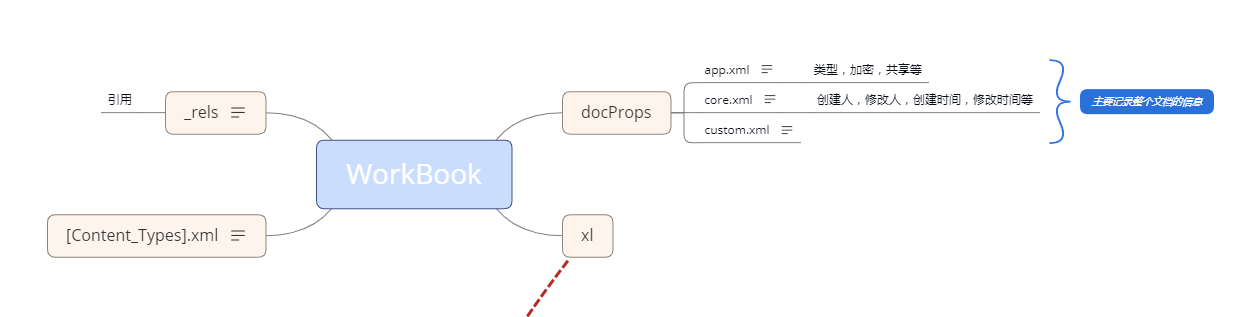
  • 文章主要探讨Excel数据存储,样式存储,合并单元格信息存储等基础数据的存储,细分Excel解压后的各个文件的职责,和存储结构。

Excel 展示图

upload successful

Excel 结构图

upload successful

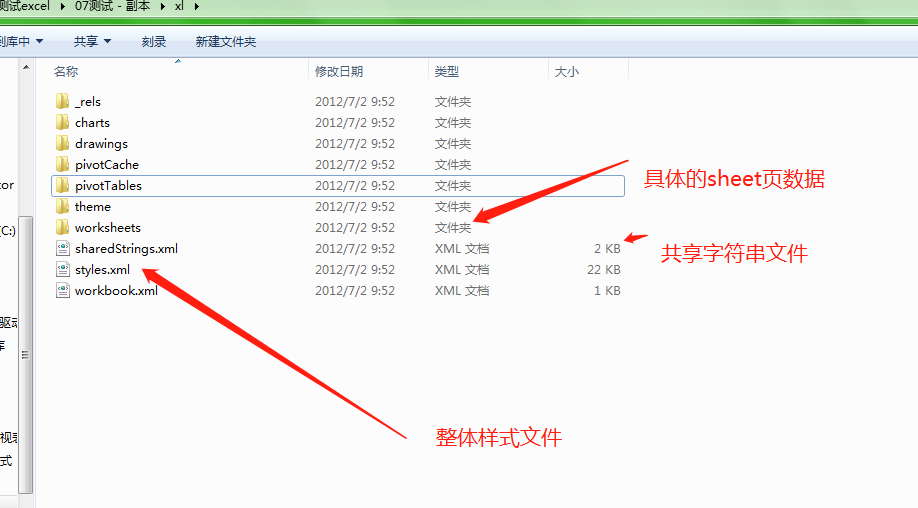
  • 需要重点介绍的其实都在 xl文件夹中

upload successful

worksheets/sheet.xml
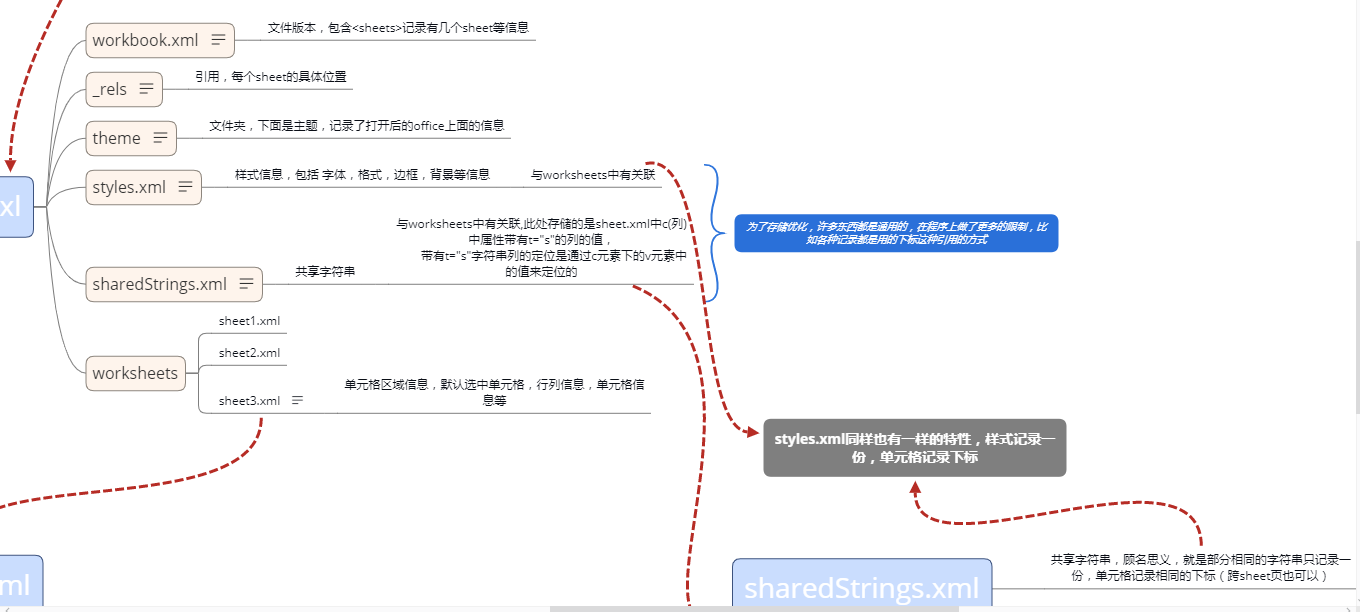
  • 记录一个sheet页的行、列、单元格、合并等信息
    1
    2
    3
    4
    5
    6
    7
    8
    9
    10
    11
    12
    13
    14
    15
    16
    17
    18
    19
    20
    21
    22
    23
    24
    25
    26
    27
    28
    29
    30
    31
    32
    33
    34
    35
    36
    37
    38
    39
    40
    41
    42
    43
    44
    45
    46
    47
    48
    49
    50
    51
    52
    53
    54
    55
    56
    57
    58
    59
    60
    61
    62
    63
    64
    65
    66
    67
    68
    69
    70
    71
    72
    73
    74
    75
    76
    77
    78
    79
    80
    81
    82
    83
    84
    85
    86
    87
    88
    89
    90
    91
    92
    93
    94
    95
    96
    97
    98
    99
    100
    101
    102
    103
    104
    105
    106
    107
    108
    109
    110
    111
    112
    113
    114
    115
    116
    117
    118
    119
    120
    121
    <?xml version="1.0" encoding="UTF-8" standalone="yes"?>
    <worksheet
    xmlns="http://schemas.openxmlformats.org/spreadsheetml/2006/main"
    xmlns:r="http://schemas.openxmlformats.org/officeDocument/2006/relationships"
    xmlns:xdr="http://schemas.openxmlformats.org/drawingml/2006/spreadsheetDrawing"
    xmlns:x14="http://schemas.microsoft.com/office/spreadsheetml/2009/9/main"
    xmlns:mc="http://schemas.openxmlformats.org/markup-compatibility/2006"
    xmlns:etc="http://www.wps.cn/officeDocument/2017/etCustomData">
    <sheetPr/>
    //单元格分布
    <dimension ref="A1:D15"/>
    //打开默认选中单元格
    <sheetViews>
    <sheetView workbookViewId="0">
    <selection activeCell="M7" sqref="M7"/>
    </sheetView>
    </sheetViews>
    //默认的行高 宽高等
    <sheetFormatPr defaultColWidth="9" defaultRowHeight="13.5" outlineLevelCol="3"/>
    //列信息
    <cols>
    <col min="2" max="2" width="19.375" customWidth="1"/>
    <col min="4" max="4" width="18.25" customWidth="1"/>
    </cols>
    //按照行 罗列每个单元格信息
    <sheetData>
    <row r="1" ht="14.25" spans="1:1">
    // t = s 单表 共享字符串 shareStrings.xml,<v> 中是存放的下标
    <c r="A1" t="s">
    <v>15</v>
    </c>
    </row>
    <row r="2" ht="14.25" spans="2:2">
    // s = 4 是单元格的样式 存放到 styles.xml中的 <cellXfs> 节点元素的下标
    <c r="B2" s="4" t="s">
    <v>16</v>
    </c>
    </row>
    <row r="3" ht="30" customHeight="1" spans="2:4">
    <c r="B3" s="5" t="s">
    <v>17</v>
    </c>
    <c r="D3" s="6" t="s">
    <v>18</v>
    </c>
    </row>
    <row r="4" ht="14.25"/>
    <row r="5" ht="14.25" spans="2:2">
    <c r="B5" s="7" t="s">
    <v>19</v>
    </c>
    </row>
    <row r="6" ht="14.25" spans="3:4">
    <c r="C6" s="8" t="s">
    <v>20</v>
    </c>
    <c r="D6" s="8"/>
    </row>
    <row r="7" ht="14.25" spans="2:4">
    <c r="B7">
    <v>1</v>
    </c>
    <c r="C7" s="9"/>
    <c r="D7" s="9"/>
    </row>
    <row r="8" ht="14.25" spans="2:2">
    <c r="B8">
    <v>2</v>
    </c>
    </row>
    <row r="9" spans="2:2">
    <c r="B9">
    //求和公式
    <f>SUM(B7:B8)</f>
    <v>3</v>
    </c>
    </row>
    <row r="13" spans="2:2">
    <c r="B13">
    <v>1</v>
    </c>
    </row>
    <row r="14" spans="2:2">
    <c r="B14">
    <v>2</v>
    </c>
    </row>
    <row r="15" spans="2:2">
    <c r="B15">
    //求和公式
    <f>SUM(B13:B14)</f>
    <v>3</v>
    </c>
    </row>
    </sheetData>
    //合并单元格信息,合并单元格中的值,由左上角单元格记录
    <mergeCells count="1">
    <mergeCell ref="C6:D7"/>
    </mergeCells>
    //条件公式信息,暂不讲解
    <conditionalFormatting sqref="B8:B9">
    <cfRule type="colorScale" priority="1">
    <colorScale>
    <cfvo type="min"/>
    <cfvo type="percentile" val="50"/>
    <cfvo type="max"/>
    <color rgb="FFF8696B"/>
    <color rgb="FFFFEB84"/>
    <color rgb="FF63BE7B"/>
    </colorScale>
    </cfRule>
    </conditionalFormatting>
    //打印用的 页边距
    <pageMargins left="0.699305555555556" right="0.699305555555556" top="0.75" bottom="0.75" header="0.3" footer="0.3"/>
    //打印纸张等
    <pageSetup paperSize="9" orientation="portrait"/>
    //页眉页脚
    <headerFooter/>
    //图表 对应 drawings 文件夹
    <drawing r:id="rId1"/>
    </worksheet>
shareStrings.xml
  • 共享字符串文件,记录每个sheet页中单元格的文本信息,而sheet.xml中只记录下标。
    1
    2
    3
    4
    5
    6
    7
    8
    9
    10
    11
    12
    13
    14
    15
    16
    17
    18
    19
    20
    21
    22
    23
    24
    25
    26
    27
    28
    29
    30
    31
    32
    33
    34
    35
    36
    37
    38
    39
    40
    41
    42
    43
    44
    45
    46
    47
    48
    49
    50
    51
    52
    53
    54
    <?xml version="1.0" encoding="UTF-8" standalone="yes"?>
    <sst
    xmlns="http://schemas.openxmlformats.org/spreadsheetml/2006/main" count="103" uniqueCount="49">
    <si>
    <t>表头</t> // 例如这个 在 sheet.xml中就 只记录 0 的下标
    </si>
    <si>
    <t>表列</t>// 例如这个 在 sheet.xml中就 只记录 1 的下标
    </si>
    *****
    <si>
    <t>数学</t>
    </si>
    <si>
    <t>小张</t>
    </si>
    <si>
    <t>小王</t>
    </si>
    <si>
    <t>英语</t>
    </si>
    <si>
    <t>总计</t>
    </si>
    <si>
    <t>语文</t>
    </si>
    <si>
    <t>测试</t>
    </si>
    <si>
    <t>B2我有上和右边</t>
    </si>
    <si>
    <t>我B3有上下粗边框</t>
    </si>
    <si>
    <t>D3我有左右</t>
    </si>
    <si>
    <t>B5 斜线</t>
    </si>
    <si>
    <t>我是合并信息</t>
    </si>
    <si>
    <t>你好</t>
    </si>
    <si>
    <t>我是百度</t>
    </si>
    *****
    </sst>
styles.xml
  • 样式文件,记录整个Excel的单元格样式信息
1
2
3
4
5
6
7
8
9
10
11
12
13
14
15
16
17
18
19
20
21
22
23
24
25
26
27
28
29
30
31
32
33
34
35
36
37
38
39
40
41
42
43
44
45
46
47
48
49
50
51
52
53
54
55
56
57
58
59
60
61
62
63
64
65
66
67
68
69
70
71
72
73
74
75
76
77
78
79
80
81
82
83
84
85
86
87
88
89
90
91
92
93
94
95
96
97
98
99
100
101
102
103
104
105
106
107
108
109
110
111
112
113
114
115
116
117
118
119
120
121
122
123
124
125
126
127
128
129
130
131
132
133
134
135
136
137
138
139
140
141
142
143
144
145
146
147
148
149
150
151
152
153
154
155
156
157
158
159
160
161
162
163
164
165
166
167
168
169
170
171
172
173
174
175
176
177
178
179
<?xml version="1.0" encoding="UTF-8" standalone="yes"?>
<styleSheet
xmlns="http://schemas.openxmlformats.org/spreadsheetml/2006/main">
//数字格式化信息
<numFmts count="4">
<numFmt numFmtId="44" formatCode="_ &quot;¥&quot;* #,##0.00_ ;_ &quot;¥&quot;* \-#,##0.00_ ;_ &quot;¥&quot;* &quot;-&quot;??_ ;_ @_ "/>
<numFmt numFmtId="41" formatCode="_ * #,##0_ ;_ * \-#,##0_ ;_ * &quot;-&quot;_ ;_ @_ "/>
<numFmt numFmtId="42" formatCode="_ &quot;¥&quot;* #,##0_ ;_ &quot;¥&quot;* \-#,##0_ ;_ &quot;¥&quot;* &quot;-&quot;_ ;_ @_ "/>
<numFmt numFmtId="43" formatCode="_ * #,##0.00_ ;_ * \-#,##0.00_ ;_ * &quot;-&quot;??_ ;_ @_ "/>
</numFmts>
//字体信息
<fonts count="20">
<font>
<sz val="11"/>
<color theme="1"/>
<name val="宋体"/>
<charset val="134"/>
<scheme val="minor"/>
</font>
<font>
<u/>
<sz val="11"/>
<color rgb="FF800080"/>
<name val="宋体"/>
<charset val="0"/>
<scheme val="minor"/>
</font>
******
</fonts>
//背景色信息
<fills count="33">
<fill>
<patternFill patternType="none"/>
</fill>
<fill>
<patternFill patternType="gray125"/>
</fill>
<fill>
<patternFill patternType="solid">
<fgColor theme="9" tint="0.599993896298105"/>
<bgColor indexed="64"/>
</patternFill>
</fill>
***
</fills>
//边框信息
<borders count="14">
<border>
<left/>
<right/>
<top/>
<bottom/>
<diagonal/>
</border>
<border>
<left/>
<right style="thick">
<color auto="1"/>
</right>
<top style="thick">
<color auto="1"/>
</top>
<bottom/>
<diagonal/>
</border>
<border>
<left/>
<right/>
<top/>
<bottom style="thick">
<color auto="1"/>
</bottom>
<diagonal/>
</border>
***
</borders>
<cellStyleXfs count="49">
***
<xf numFmtId="0" fontId="2" fillId="2" borderId="0" applyNumberFormat="0" applyBorder="0" applyAlignment="0" applyProtection="0">
<alignment vertical="center"/>
</xf>
<xf numFmtId="0" fontId="6" fillId="5" borderId="0" applyNumberFormat="0" applyBorder="0" applyAlignment="0" applyProtection="0">
<alignment vertical="center"/>
</xf>
</cellStyleXfs>
//单元格样式信息
<cellXfs count="10">
//对应上方的 xml节点的下标
<xf numFmtId="0" fontId="0" fillId="0" borderId="0" xfId="0">
<alignment vertical="center"/>
</xf>
<xf numFmtId="0" fontId="0" fillId="0" borderId="0" xfId="0" applyAlignment="1">
<alignment horizontal="center" vertical="center"/>
</xf>
<xf numFmtId="0" fontId="0" fillId="0" borderId="0" xfId="0" applyAlignment="1">
<alignment vertical="center"/>
</xf>
<xf numFmtId="0" fontId="1" fillId="0" borderId="0" xfId="10" applyFont="1">
<alignment vertical="center"/>
</xf>
<xf numFmtId="0" fontId="0" fillId="0" borderId="1" xfId="0" applyBorder="1">
<alignment vertical="center"/>
</xf>
<xf numFmtId="0" fontId="0" fillId="0" borderId="2" xfId="0" applyBorder="1">
<alignment vertical="center"/>
</xf>
<xf numFmtId="0" fontId="0" fillId="0" borderId="3" xfId="0" applyBorder="1">
<alignment vertical="center"/>
</xf>
<xf numFmtId="0" fontId="0" fillId="0" borderId="4" xfId="0" applyBorder="1">
<alignment vertical="center"/>
</xf>
<xf numFmtId="0" fontId="0" fillId="0" borderId="5" xfId="0" applyBorder="1" applyAlignment="1">
<alignment horizontal="center" vertical="center"/>
</xf>
<xf numFmtId="0" fontId="0" fillId="0" borderId="2" xfId="0" applyBorder="1" applyAlignment="1">
<alignment horizontal="center" vertical="center"/>
</xf>
</cellXfs>
<cellStyles count="49">
<cellStyle name="常规" xfId="0" builtinId="0"/>
<cellStyle name="货币[0]" xfId="1" builtinId="7"/>
<cellStyle name="20% - 强调文字颜色 3" xfId="2" builtinId="38"/>
<cellStyle name="输入" xfId="3" builtinId="20"/>
<cellStyle name="货币" xfId="4" builtinId="4"/>
<cellStyle name="千位分隔[0]" xfId="5" builtinId="6"/>
<cellStyle name="40% - 强调文字颜色 3" xfId="6" builtinId="39"/>
<cellStyle name="差" xfId="7" builtinId="27"/>
<cellStyle name="千位分隔" xfId="8" builtinId="3"/>
<cellStyle name="60% - 强调文字颜色 3" xfId="9" builtinId="40"/>
<cellStyle name="超链接" xfId="10" builtinId="8"/>
<cellStyle name="百分比" xfId="11" builtinId="5"/>
<cellStyle name="已访问的超链接" xfId="12" builtinId="9"/>
<cellStyle name="注释" xfId="13" builtinId="10"/>
<cellStyle name="60% - 强调文字颜色 2" xfId="14" builtinId="36"/>
<cellStyle name="标题 4" xfId="15" builtinId="19"/>
<cellStyle name="警告文本" xfId="16" builtinId="11"/>
<cellStyle name="标题" xfId="17" builtinId="15"/>
<cellStyle name="解释性文本" xfId="18" builtinId="53"/>
<cellStyle name="标题 1" xfId="19" builtinId="16"/>
<cellStyle name="标题 2" xfId="20" builtinId="17"/>
<cellStyle name="60% - 强调文字颜色 1" xfId="21" builtinId="32"/>
<cellStyle name="标题 3" xfId="22" builtinId="18"/>
<cellStyle name="60% - 强调文字颜色 4" xfId="23" builtinId="44"/>
<cellStyle name="输出" xfId="24" builtinId="21"/>
<cellStyle name="计算" xfId="25" builtinId="22"/>
<cellStyle name="检查单元格" xfId="26" builtinId="23"/>
<cellStyle name="20% - 强调文字颜色 6" xfId="27" builtinId="50"/>
<cellStyle name="强调文字颜色 2" xfId="28" builtinId="33"/>
<cellStyle name="链接单元格" xfId="29" builtinId="24"/>
<cellStyle name="汇总" xfId="30" builtinId="25"/>
<cellStyle name="好" xfId="31" builtinId="26"/>
<cellStyle name="适中" xfId="32" builtinId="28"/>
<cellStyle name="20% - 强调文字颜色 5" xfId="33" builtinId="46"/>
<cellStyle name="强调文字颜色 1" xfId="34" builtinId="29"/>
<cellStyle name="20% - 强调文字颜色 1" xfId="35" builtinId="30"/>
<cellStyle name="40% - 强调文字颜色 1" xfId="36" builtinId="31"/>
<cellStyle name="20% - 强调文字颜色 2" xfId="37" builtinId="34"/>
<cellStyle name="40% - 强调文字颜色 2" xfId="38" builtinId="35"/>
<cellStyle name="强调文字颜色 3" xfId="39" builtinId="37"/>
<cellStyle name="强调文字颜色 4" xfId="40" builtinId="41"/>
<cellStyle name="20% - 强调文字颜色 4" xfId="41" builtinId="42"/>
<cellStyle name="40% - 强调文字颜色 4" xfId="42" builtinId="43"/>
<cellStyle name="强调文字颜色 5" xfId="43" builtinId="45"/>
<cellStyle name="40% - 强调文字颜色 5" xfId="44" builtinId="47"/>
<cellStyle name="60% - 强调文字颜色 5" xfId="45" builtinId="48"/>
<cellStyle name="强调文字颜色 6" xfId="46" builtinId="49"/>
<cellStyle name="40% - 强调文字颜色 6" xfId="47" builtinId="51"/>
<cellStyle name="60% - 强调文字颜色 6" xfId="48" builtinId="52"/>
</cellStyles>

<tableStyles count="0" defaultTableStyle="TableStyleMedium2" defaultPivotStyle="PivotStyleLight16"/>
<extLst>
<ext uri="{EB79DEF2-80B8-43e5-95BD-54CBDDF9020C}"
xmlns:x14="http://schemas.microsoft.com/office/spreadsheetml/2009/9/main">
<x14:slicerStyles defaultSlicerStyle="SlicerStyleLight1"/>
</ext>
</extLst>
</styleSheet>
总结

upload successful

  • Excel在存储上 做了很多的优化,所以07版本 的比 03版本的容量更小却可以存储更多的数据,但是这样通过下标的方式优化了存储对程序而言是一个不小的挑战