Excel条件格式
- 在Excel表格中进行数据分析时,您可能需要通过一些特征条件来找到特定的数据,还可能需要用更直观的方法来展现数据规律。
手写公式的条件格式
需求
- 原始数据如下
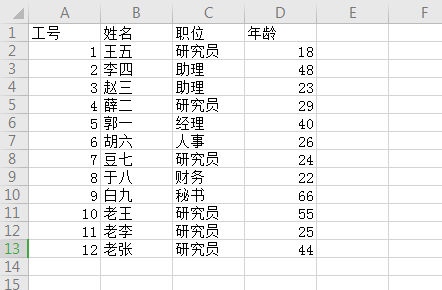
- 要求
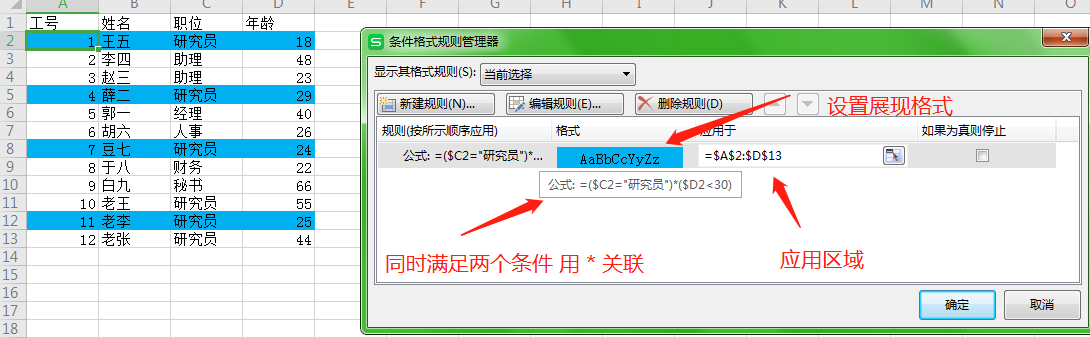
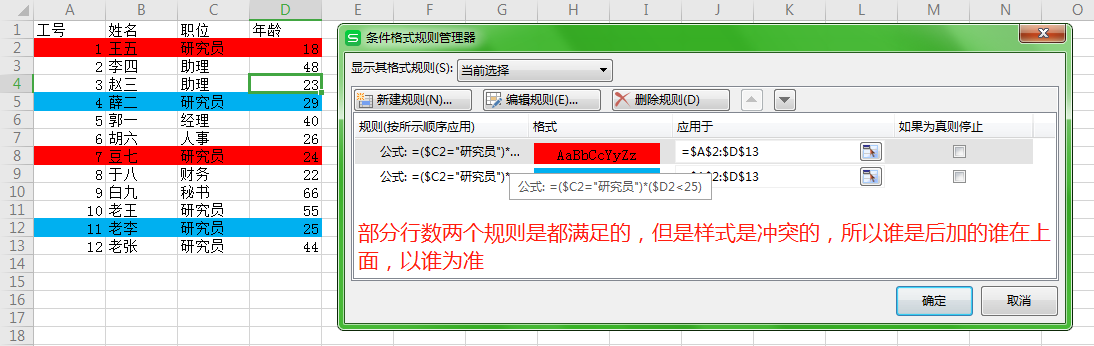
- 公司将进行一次内部晋升,需要将年龄为30岁以下的所有“研究员” 用蓝色背景标识出来
- 公司将进行一次内部晋升,需要将年龄为25岁以下的所有“研究员” 用红色背景色标识出来
- 公司将进行一次内部晋升,需要将年龄为20岁以下的所有“研究员” 用下划线 标识出来(探讨 如果为真则停止 这个勾选框)
效果
- 一个条件
- 二个样式冲突的条件
- 样式不冲突的条件
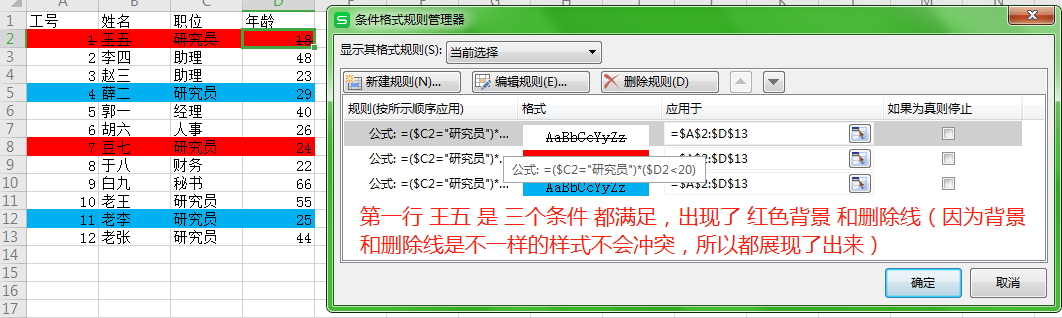
- 如果为真则停止
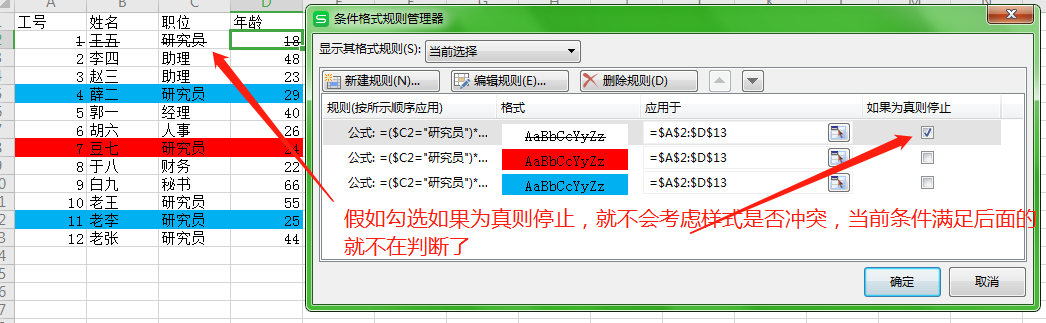
做了几个效果图方便理解 Excel中条件格式的各种行为和设置,下面我们看存储结构吧
存储
- sheet.xml
1 |
|
styles.xml
1
2
3
4
5
6
7
8
9
10
11
12
13
14
15
16
17
18
19
20
21
22
23
24
25
26
27
28
29
30
31
32
33
34
35
36
37
38
39
40
<styleSheet
xmlns="http://schemas.openxmlformats.org/spreadsheetml/2006/main">
<numFmts count="4">
<numFmt numFmtId="44" formatCode="_ "¥"* #,##0.00_ ;_ "¥"* \-#,##0.00_ ;_ "¥"* "-"??_ ;_ @_ "/>
<numFmt numFmtId="41" formatCode="_ * #,##0_ ;_ * \-#,##0_ ;_ * "-"_ ;_ @_ "/>
<numFmt numFmtId="42" formatCode="_ "¥"* #,##0_ ;_ "¥"* \-#,##0_ ;_ "¥"* "-"_ ;_ @_ "/>
<numFmt numFmtId="43" formatCode="_ * #,##0.00_ ;_ * \-#,##0.00_ ;_ * "-"??_ ;_ @_ "/>
</numFmts>
******
//条件格式的样式
<dxfs count="3">
<dxf>
<fill>
<patternFill patternType="solid">
<bgColor rgb="FF00B0F0"/>
</patternFill>
</fill>
</dxf>
<dxf>
<fill>
<patternFill patternType="solid">
<bgColor rgb="FFFF0000"/>
</patternFill>
</fill>
</dxf>
<dxf>
<font>
<strike val="1"/>
</font>
</dxf>
</dxfs>
<tableStyles count="0" defaultTableStyle="TableStyleMedium2" defaultPivotStyle="PivotStyleLight16"/>
<extLst>
<ext uri="{EB79DEF2-80B8-43e5-95BD-54CBDDF9020C}"
xmlns:x14="http://schemas.microsoft.com/office/spreadsheetml/2009/9/main">
<x14:slicerStyles defaultSlicerStyle="SlicerStyleLight1"/>
</ext>
</extLst>
</styleSheet>上述两个 xml文件 存储结构对应 效果图 还是比较好理解的
Excel自带的条件格式
- Excel中自己带有的部分简便的条件公式。可以探讨下它的存储结构
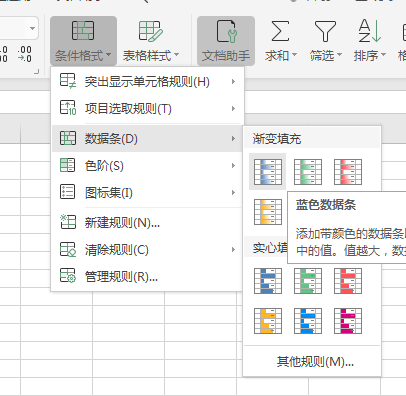
- 效果图
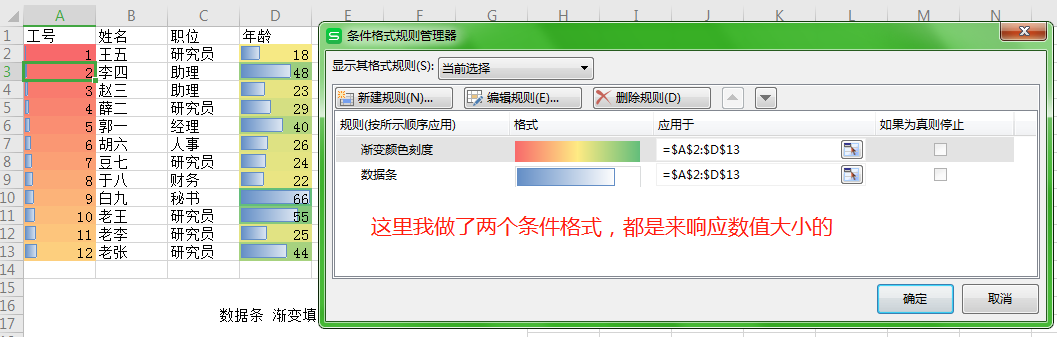
- 存储
1 |
|
这里看存储结构,就没有 手写公式那么的清晰明了。涉及到Excel程序的内容就过多了