背景
最近项目上想要对现在用的表格组件进行底层重构,所以对类似的产品Excel的存储结构上是否有可以借鉴的地方,所以就有了今天的这篇文章。
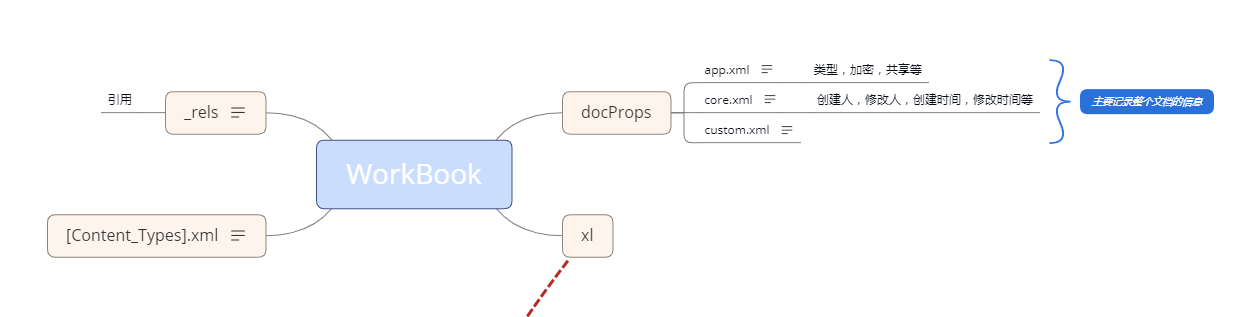
文章主要探讨Excel数据存储,样式存储,合并单元格信息存储等基础数据的存储,细分Excel解压后的各个文件的职责,和存储结构。
Excel 展示图

Excel 结构图
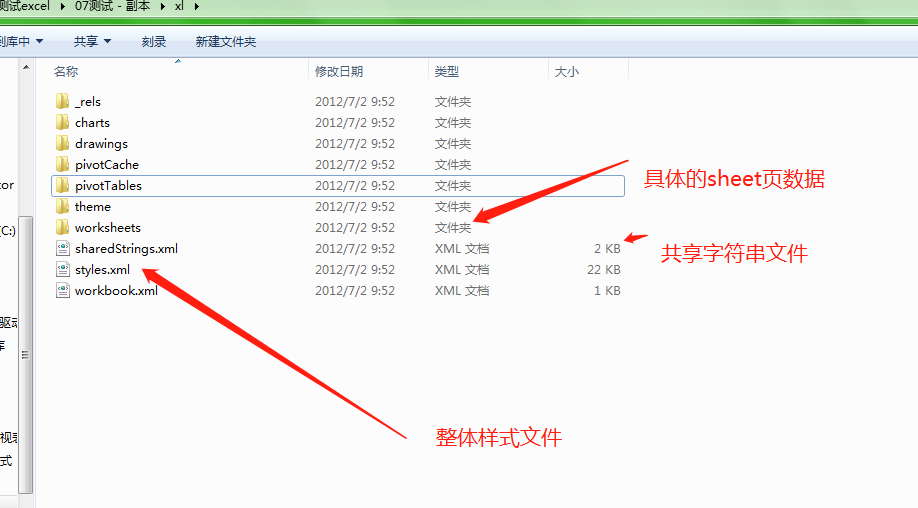
- 需要重点介绍的其实都在 xl文件夹中
worksheets/sheet.xml
- 记录一个sheet页的行、列、单元格、合并等信息
1
2
3
4
5
6
7
8
9
10
11
12
13
14
15
16
17
18
19
20
21
22
23
24
25
26
27
28
29
30
31
32
33
34
35
36
37
38
39
40
41
42
43
44
45
46
47
48
49
50
51
52
53
54
55
56
57
58
59
60
61
62
63
64
65
66
67
68
69
70
71
72
73
74
75
76
77
78
79
80
81
82
83
84
85
86
87
88
89
90
91
92
93
94
95
96
97
98
99
100
101
102
103
104
105
106
107
108
109
110
111
112
113
114
115
116
117
118
119
120
121
<?xml version="1.0" encoding="UTF-8" standalone="yes"?>
<worksheet
xmlns="http://schemas.openxmlformats.org/spreadsheetml/2006/main"
xmlns:r="http://schemas.openxmlformats.org/officeDocument/2006/relationships"
xmlns:xdr="http://schemas.openxmlformats.org/drawingml/2006/spreadsheetDrawing"
xmlns:x14="http://schemas.microsoft.com/office/spreadsheetml/2009/9/main"
xmlns:mc="http://schemas.openxmlformats.org/markup-compatibility/2006"
xmlns:etc="http://www.wps.cn/officeDocument/2017/etCustomData">
<sheetPr/>
//单元格分布
<dimension ref="A1:D15"/>
//打开默认选中单元格
<sheetViews>
<sheetView workbookViewId="0">
<selection activeCell="M7" sqref="M7"/>
</sheetView>
</sheetViews>
//默认的行高 宽高等
<sheetFormatPr defaultColWidth="9" defaultRowHeight="13.5" outlineLevelCol="3"/>
//列信息
<cols>
<col min="2" max="2" width="19.375" customWidth="1"/>
<col min="4" max="4" width="18.25" customWidth="1"/>
</cols>
//按照行 罗列每个单元格信息
<sheetData>
<row r="1" ht="14.25" spans="1:1">
// t = s 单表 共享字符串 shareStrings.xml,<v> 中是存放的下标
<c r="A1" t="s">
<v>15</v>
</c>
</row>
<row r="2" ht="14.25" spans="2:2">
// s = 4 是单元格的样式 存放到 styles.xml中的 <cellXfs> 节点元素的下标
<c r="B2" s="4" t="s">
<v>16</v>
</c>
</row>
<row r="3" ht="30" customHeight="1" spans="2:4">
<c r="B3" s="5" t="s">
<v>17</v>
</c>
<c r="D3" s="6" t="s">
<v>18</v>
</c>
</row>
<row r="4" ht="14.25"/>
<row r="5" ht="14.25" spans="2:2">
<c r="B5" s="7" t="s">
<v>19</v>
</c>
</row>
<row r="6" ht="14.25" spans="3:4">
<c r="C6" s="8" t="s">
<v>20</v>
</c>
<c r="D6" s="8"/>
</row>
<row r="7" ht="14.25" spans="2:4">
<c r="B7">
<v>1</v>
</c>
<c r="C7" s="9"/>
<c r="D7" s="9"/>
</row>
<row r="8" ht="14.25" spans="2:2">
<c r="B8">
<v>2</v>
</c>
</row>
<row r="9" spans="2:2">
<c r="B9">
//求和公式
<f>SUM(B7:B8)</f>
<v>3</v>
</c>
</row>
<row r="13" spans="2:2">
<c r="B13">
<v>1</v>
</c>
</row>
<row r="14" spans="2:2">
<c r="B14">
<v>2</v>
</c>
</row>
<row r="15" spans="2:2">
<c r="B15">
//求和公式
<f>SUM(B13:B14)</f>
<v>3</v>
</c>
</row>
</sheetData>
//合并单元格信息,合并单元格中的值,由左上角单元格记录
<mergeCells count="1">
<mergeCell ref="C6:D7"/>
</mergeCells>
//条件公式信息,暂不讲解
<conditionalFormatting sqref="B8:B9">
<cfRule type="colorScale" priority="1">
<colorScale>
<cfvo type="min"/>
<cfvo type="percentile" val="50"/>
<cfvo type="max"/>
<color rgb="FFF8696B"/>
<color rgb="FFFFEB84"/>
<color rgb="FF63BE7B"/>
</colorScale>
</cfRule>
</conditionalFormatting>
//打印用的 页边距
<pageMargins left="0.699305555555556" right="0.699305555555556" top="0.75" bottom="0.75" header="0.3" footer="0.3"/>
//打印纸张等
<pageSetup paperSize="9" orientation="portrait"/>
//页眉页脚
<headerFooter/>
//图表 对应 drawings 文件夹
<drawing r:id="rId1"/>
</worksheet>
shareStrings.xml
- 共享字符串文件,记录每个sheet页中单元格的文本信息,而sheet.xml中只记录下标。
1
2
3
4
5
6
7
8
9
10
11
12
13
14
15
16
17
18
19
20
21
22
23
24
25
26
27
28
29
30
31
32
33
34
35
36
37
38
39
40
41
42
43
44
45
46
47
48
49
50
51
52
53
54
<?xml version="1.0" encoding="UTF-8" standalone="yes"?>
<sst
xmlns="http://schemas.openxmlformats.org/spreadsheetml/2006/main" count="103" uniqueCount="49">
<si>
<t>表头</t> // 例如这个 在 sheet.xml中就 只记录 0 的下标
</si>
<si>
<t>表列</t>// 例如这个 在 sheet.xml中就 只记录 1 的下标
</si>
*****
<si>
<t>数学</t>
</si>
<si>
<t>小张</t>
</si>
<si>
<t>小王</t>
</si>
<si>
<t>英语</t>
</si>
<si>
<t>总计</t>
</si>
<si>
<t>语文</t>
</si>
<si>
<t>测试</t>
</si>
<si>
<t>B2我有上和右边</t>
</si>
<si>
<t>我B3有上下粗边框</t>
</si>
<si>
<t>D3我有左右</t>
</si>
<si>
<t>B5 斜线</t>
</si>
<si>
<t>我是合并信息</t>
</si>
<si>
<t>你好</t>
</si>
<si>
<t>我是百度</t>
</si>
*****
</sst>
styles.xml
- 样式文件,记录整个Excel的单元格样式信息
1 | <?xml version="1.0" encoding="UTF-8" standalone="yes"?> |
总结
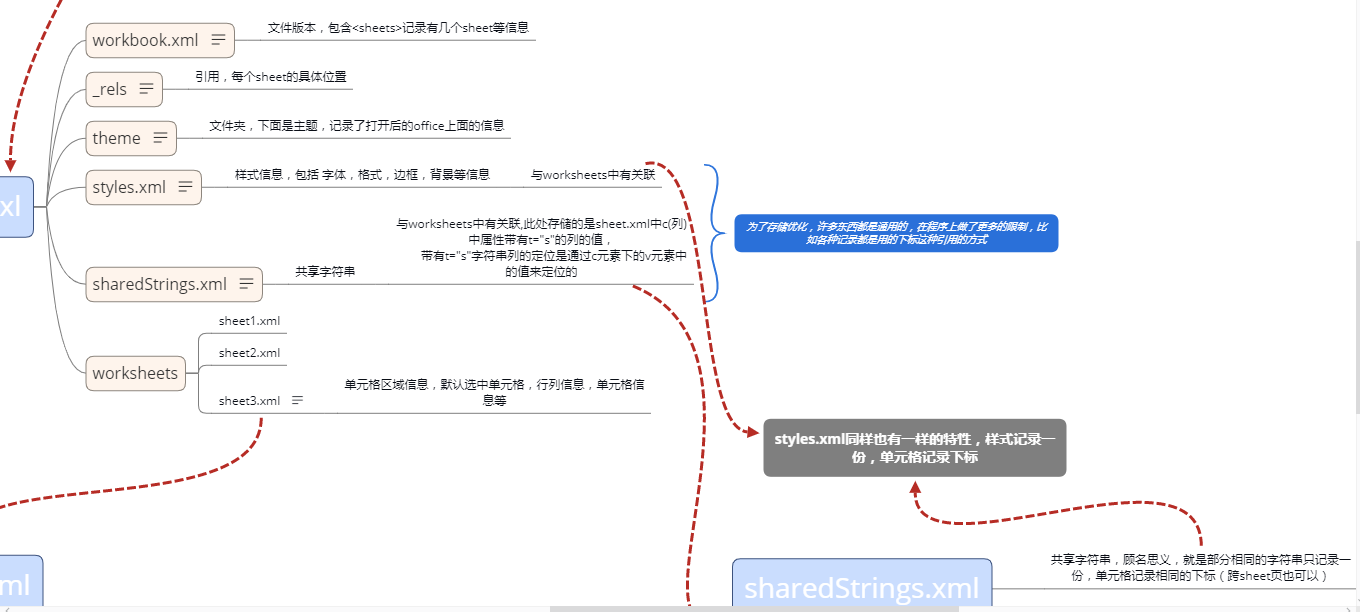
- Excel在存储上 做了很多的优化,所以07版本 的比 03版本的容量更小却可以存储更多的数据,但是这样通过下标的方式优化了存储对程序而言是一个不小的挑战