springboot推荐使用jar包发布,内置tomcat,所以我们通过nginx配置https的时候,思路是和用war包发布到tomcat的一样的,浏览器与web服务器nginx用https连接,nginx与内置tomcat用http连接
要求:有nginx的配置经验,有springboot开发经验
目标:兼容https、http(http不会转到https,还是http请求。https访问就是https)
1、先在阿里云申请证书,比如:我要申请 www.luckylxh.top 的证书,申请成功后,找到这个页面,下载pem和key,按照要求放入服务器
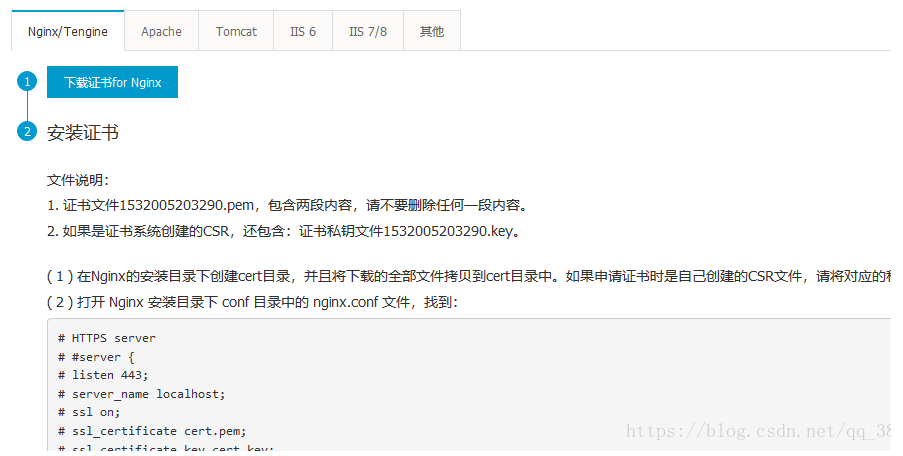
2、修改nginx.conf为1
2
3
4
5
6
7
8
9
10
11
12
13
14
15
16
17
18
19
20
21
22
23
24
25#springboot 后台的 http https 通用
server {
listen 172.27.0.14:80;
listen 172.27.0.14:443 ssl;
server_name www.luckylxh.top;
ssl_certificate cert/1532005203290.pem;
ssl_certificate_key cert/1532005203290.key;
ssl_session_timeout 5m;
ssl_ciphers ECDHE-RSA-AES128-GCM-SHA256:ECDHE:ECDH:AES:HIGH:!NULL:!aNULL:!MD5:!ADH:!RC4;
ssl_protocols TLSv1 TLSv1.1 TLSv1.2;
ssl_prefer_server_ciphers on;
#最后默认的
location / {
proxy_pass http://localhost:8080;
proxy_set_header Host $host;
proxy_set_header X-Real-IP $remote_addr;
proxy_set_header REMOTE-HOST $remote_addr;
proxy_set_header X-Forwarded-For $proxy_add_x_forwarded_for;
proxy_connect_timeout 1;
proxy_send_timeout 30;
proxy_read_timeout 80;
}
}
3、后台springboot
1
2
3
4
5
6
server:
tomcat:
remote_ip_header: x-forwarded-for
protocol_header: x-forwarded-proto
port-header: X-Forwarded-Port
use-forward-headers: true
然后以 8080 jar包方式启动就行了