Excel分组的存储结构浅析

WPS 中Excel 创建组数据存储分析

在工作中常遇到长篇幅的数据报表。

将表格数据分组显示可以更加直观的让我们观察数据、整理数据。
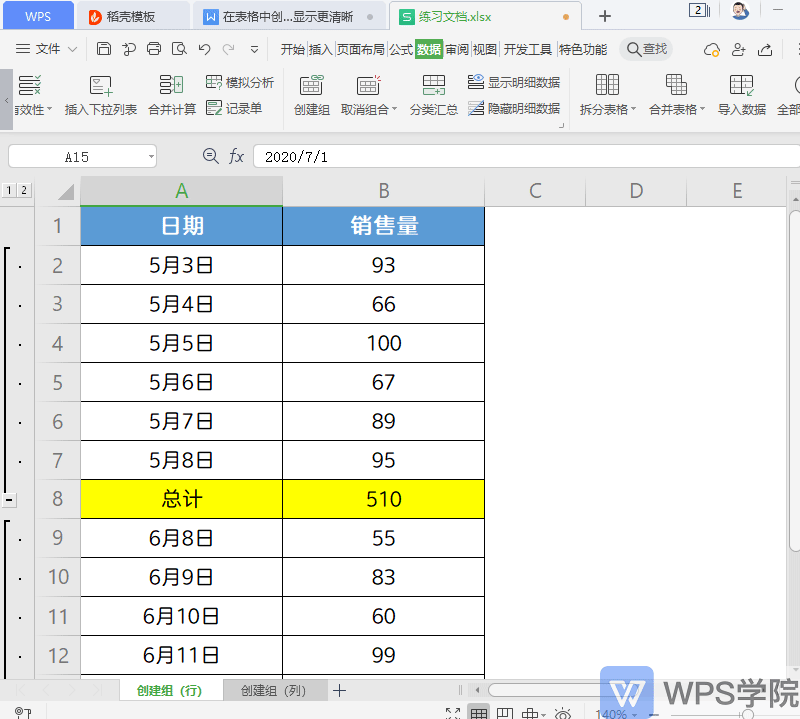
upload successful

如上图所示,探究下其文件存储格式

行分组


  • 行方向的分组

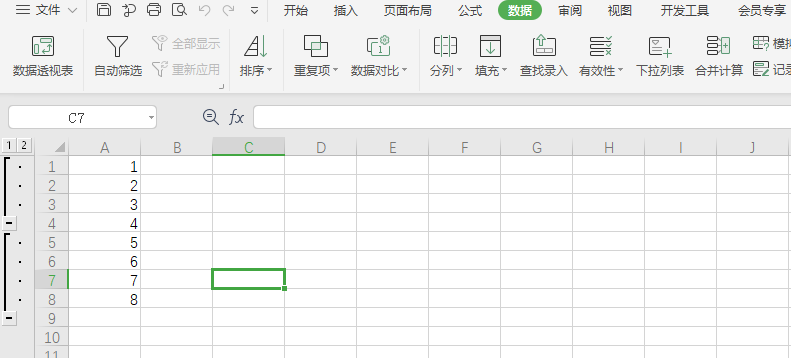
两个行分组

  • 两个行分组 直接必须至少空一行,否则会变成一个行分组

upload successful

  • 数据结构 sheet1.xml
1
2
3
4
5
6
7
8
9
10
11
12
13
14
15
16
17
18
19
20
21
22
23
24
25
26
27
28
29
30
31
32
33
34
35
36
37
38
39
40
41
42
43
44
45
46
47
48
49
50
51
52
53
54
55
56
57
58
<?xml version="1.0" encoding="UTF-8" standalone="yes"?>
<worksheet xmlns="http://schemas.openxmlformats.org/spreadsheetml/2006/main" xmlns:r="http://schemas.openxmlformats.org/officeDocument/2006/relationships" xmlns:xdr="http://schemas.openxmlformats.org/drawingml/2006/spreadsheetDrawing" xmlns:x14="http://schemas.microsoft.com/office/spreadsheetml/2009/9/main" xmlns:mc="http://schemas.openxmlformats.org/markup-compatibility/2006" xmlns:etc="http://www.wps.cn/officeDocument/2017/etCustomData">
<sheetPr/>
<dimension ref="A1:A8"/>
<sheetViews>
<sheetView tabSelected="1" workbookViewId="0">
<selection activeCell="A5" sqref="A5:A8"/>
</sheetView>
</sheetViews>
<sheetFormatPr defaultColWidth="9" defaultRowHeight="14.25" outlineLevelRow="7"/>
<sheetData>
// row 上带有了 outlineLevel 代表是行分组 值 是1 代表了是1层级
//层级代表了是否有嵌套,可以见 行分组嵌套
<row r="1" outlineLevel="1" spans="1:1">
<c r="A1">
<v>1</v>
</c>
</row>
<row r="2" outlineLevel="1" spans="1:1">
<c r="A2">
<v>2</v>
</c>
</row>
<row r="3" outlineLevel="1" spans="1:1">
<c r="A3">
<v>3</v>
</c>
</row>
// 第4行没有 所以 页面上 是两个行分组 如果第4行也有 应该会变成一个行分组
<row r="4" spans="1:1">
<c r="A4">
<v>4</v>
</c>
</row>
<row r="5" outlineLevel="1" spans="1:1">
<c r="A5">
<v>5</v>
</c>
</row>
<row r="6" outlineLevel="1" spans="1:1">
<c r="A6">
<v>6</v>
</c>
</row>
<row r="7" outlineLevel="1" spans="1:1">
<c r="A7">
<v>7</v>
</c>
</row>
<row r="8" outlineLevel="1" spans="1:1">
<c r="A8">
<v>8</v>
</c>
</row>
</sheetData>
<pageMargins left="0.7" right="0.7" top="0.75" bottom="0.75" header="0.3" footer="0.3"/>
<headerFooter/>
</worksheet>

行分组嵌套

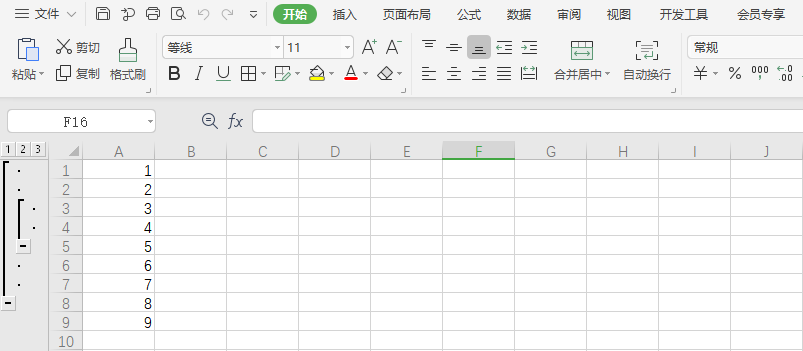
  • 一个行分组中包括了另一个行分组

upload successful

  • 数据结构 sheet1.xml
1
2
3
4
5
6
7
8
9
10
11
12
13
14
15
16
17
18
19
20
21
22
23
24
25
26
27
28
29
30
31
32
33
34
35
36
37
38
39
40
41
42
43
44
45
46
47
48
49
50
51
52
53
54
55
56
57
58
59
60
61
<?xml version="1.0" encoding="UTF-8" standalone="yes"?>
<worksheet xmlns="http://schemas.openxmlformats.org/spreadsheetml/2006/main" xmlns:r="http://schemas.openxmlformats.org/officeDocument/2006/relationships" xmlns:xdr="http://schemas.openxmlformats.org/drawingml/2006/spreadsheetDrawing" xmlns:x14="http://schemas.microsoft.com/office/spreadsheetml/2009/9/main" xmlns:mc="http://schemas.openxmlformats.org/markup-compatibility/2006" xmlns:etc="http://www.wps.cn/officeDocument/2017/etCustomData">
<sheetPr/>
<dimension ref="A1:A9"/>
<sheetViews>
<sheetView tabSelected="1" workbookViewId="0">
<selection activeCell="A3" sqref="A3:A4"/>
</sheetView>
</sheetViews>
<sheetFormatPr defaultColWidth="9" defaultRowHeight="14.25"/>
<sheetData>
<row r="1" outlineLevel="1" spans="1:1">
<c r="A1">
<v>1</v>
</c>
</row>
<row r="2" outlineLevel="1" spans="1:1">
<c r="A2">
<v>2</v>
</c>
</row>
// outlineLevel 层级为 2 嵌入到了 为1的层级
<row r="3" outlineLevel="2" spans="1:1">
<c r="A3">
<v>3</v>
</c>
</row>
<row r="4" outlineLevel="2" spans="1:1">
<c r="A4">
<v>4</v>
</c>
</row>
<row r="5" outlineLevel="1" spans="1:1">
<c r="A5">
<v>5</v>
</c>
</row>
<row r="6" outlineLevel="1" spans="1:1">
<c r="A6">
<v>6</v>
</c>
</row>
<row r="7" outlineLevel="1" spans="1:1">
<c r="A7">
<v>7</v>
</c>
</row>
<row r="8" spans="1:1">
<c r="A8">
<v>8</v>
</c>
</row>
<row r="9" spans="1:1">
<c r="A9">
<v>9</v>
</c>
</row>
</sheetData>
<pageMargins left="0.7" right="0.7" top="0.75" bottom="0.75" header="0.3" footer="0.3"/>
<headerFooter/>
</worksheet>

列分组


  • 列方向的分组

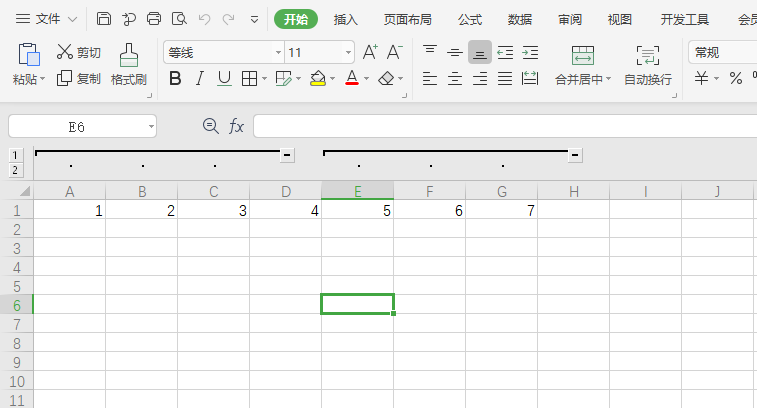
两个列分组

  • 两个列方向的分组 分组直接至少空一列 否则会变成一个列分组

upload successful

  • 数据结构 sheet1.xml
1
2
3
4
5
6
7
8
9
10
11
12
13
14
15
16
17
18
19
20
21
22
23
24
25
26
27
28
29
30
31
32
33
34
35
36
37
38
39
40
41
42
43
<?xml version="1.0" encoding="UTF-8" standalone="yes"?>
<worksheet xmlns="http://schemas.openxmlformats.org/spreadsheetml/2006/main" xmlns:r="http://schemas.openxmlformats.org/officeDocument/2006/relationships" xmlns:xdr="http://schemas.openxmlformats.org/drawingml/2006/spreadsheetDrawing" xmlns:x14="http://schemas.microsoft.com/office/spreadsheetml/2009/9/main" xmlns:mc="http://schemas.openxmlformats.org/markup-compatibility/2006" xmlns:etc="http://www.wps.cn/officeDocument/2017/etCustomData">
<sheetPr/>
<dimension ref="A1:G1"/>
<sheetViews>
<sheetView tabSelected="1" workbookViewId="0">
<selection activeCell="E1" sqref="E1:G1"/>
</sheetView>
</sheetViews>
<sheetFormatPr defaultColWidth="9" defaultRowHeight="14.25" outlineLevelCol="6"/>
<cols>
//这里记录 列方向的 分组信息
<col min="1" max="3" width="9" outlineLevel="1"/>
<col min="5" max="7" width="9" outlineLevel="1"/>
</cols>
<sheetData>
<row r="1" spans="1:7">
<c r="A1">
<v>1</v>
</c>
<c r="B1">
<v>2</v>
</c>
<c r="C1">
<v>3</v>
</c>
<c r="D1">
<v>4</v>
</c>
<c r="E1">
<v>5</v>
</c>
<c r="F1">
<v>6</v>
</c>
<c r="G1">
<v>7</v>
</c>
</row>
</sheetData>
<pageMargins left="0.7" right="0.7" top="0.75" bottom="0.75" header="0.3" footer="0.3"/>
<headerFooter/>
</worksheet>

列分组嵌套

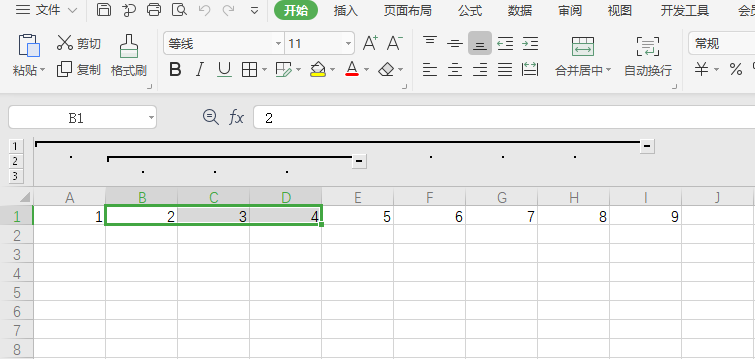
  • 一个列分组中包括另一个列分组

upload successful

  • 数据结构 sheet1.xml
1
2
3
4
5
6
7
8
9
10
11
12
13
14
15
16
17
18
19
20
21
22
23
24
25
26
27
28
29
30
31
32
33
34
35
36
37
38
39
40
41
42
43
44
45
46
47
48
49
50
<?xml version="1.0" encoding="UTF-8" standalone="yes"?>
<worksheet xmlns="http://schemas.openxmlformats.org/spreadsheetml/2006/main" xmlns:r="http://schemas.openxmlformats.org/officeDocument/2006/relationships" xmlns:xdr="http://schemas.openxmlformats.org/drawingml/2006/spreadsheetDrawing" xmlns:x14="http://schemas.microsoft.com/office/spreadsheetml/2009/9/main" xmlns:mc="http://schemas.openxmlformats.org/markup-compatibility/2006" xmlns:etc="http://www.wps.cn/officeDocument/2017/etCustomData">
<sheetPr/>
<dimension ref="A1:I1"/>
<sheetViews>
<sheetView tabSelected="1" workbookViewId="0">
<selection activeCell="B1" sqref="B1:D1"/>
</sheetView>
</sheetViews>
<sheetFormatPr defaultColWidth="9" defaultRowHeight="14.25"/>
<cols>
// 同样逻辑 通过outlineLevel 层级描述嵌套
<col min="1" max="1" width="9" outlineLevel="1"/>
<col min="2" max="4" width="9" outlineLevel="2"/>
<col min="5" max="8" width="9" outlineLevel="1"/>
</cols>
<sheetData>
<row r="1" spans="1:9">
<c r="A1">
<v>1</v>
</c>
<c r="B1">
<v>2</v>
</c>
<c r="C1">
<v>3</v>
</c>
<c r="D1">
<v>4</v>
</c>
<c r="E1">
<v>5</v>
</c>
<c r="F1">
<v>6</v>
</c>
<c r="G1">
<v>7</v>
</c>
<c r="H1">
<v>8</v>
</c>
<c r="I1">
<v>9</v>
</c>
</row>
</sheetData>
<pageMargins left="0.7" right="0.7" top="0.75" bottom="0.75" header="0.3" footer="0.3"/>
<headerFooter/>
</worksheet>