Electron 学习

简介

electron 是基于 nodejs的一个封装了一个谷歌的浏览器内核,让我们写js代码就可以开发出来一个桌面应用,适合web项目 封装单机版.

npm 依赖

直接加入

1
"electron": "^9.2.0",

就直接吧 electron依赖进来了
main.js是 electron默认的入口文件 在里面我们就可以开始我们的开发了,可以参照官方文档

启动

1
2
3
4
5
6
7
8
9
10
11
12
13
14
 	{
"name": "electron-demo",
"version": "1.0.0",
"description": "",
"main": "main.js",//默认的入口文件
"scripts": {
"start": "electron ." //启动命令
},
"author": "",
"license": "ISC",
"devDependencies": {
"electron": "^9.2.0"
}
}

打包

1
2
3
4
5
6
7
8
9
10
11
12
13
14
15
16
17
18
19
20
21
22
23
24
25
26
27
 	{
"name": "electron-demo",
"version": "1.0.0",
"description": "",
"main": "main.js",
"scripts": {
"test": "echo \"Error: no test specified\" && exit 1",
"start": "electron .",
"package": "electron-packager ./ --out dist --overwrite --icon=icon/window.ico", // electron-packager 是一种打包方式
"pack": "electron-builder --dir --win --x64", // electron-builder是另外一种打包方式
"dist": "electron-builder"
},
"author": "",
"license": "ISC",
"devDependencies": {
"electron": "^9.2.0",
"electron-builder": "^22.8.0",
"electron-packager": "^15.0.0"
},
"build": { //electron-builder 配合使用 可以更改 win上的 打包exe的图标
"productName": "blog",
"appId": "blog.luckylxh.top",
"win": {
"icon": "icon/favicon.ico"
}
}
}

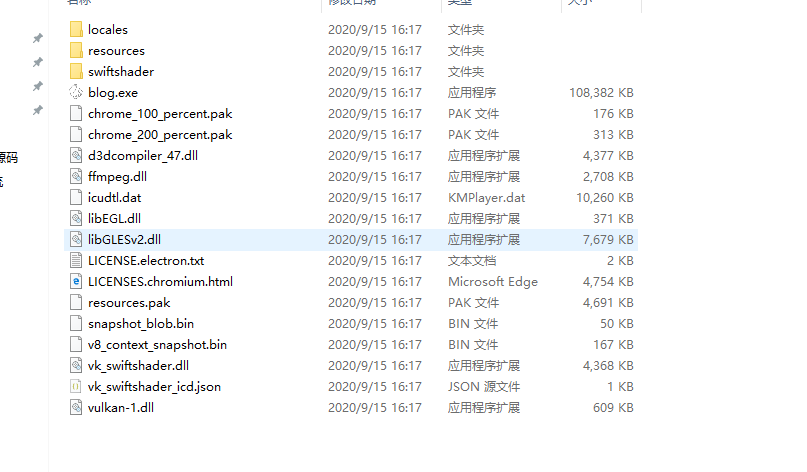
打包后的样式如下

upload successful

双击 exe就可以运行!